If you take cards through Orchid POS or Orchid eCommerce, First American Payment Systems (FAPS) processes them and mails or emails you a statement each month. This guide walks through the statement one section at a time, with a zoomed-in picture of each part, so you can see what you sold, what you paid, and what reached your bank.
💡 Good to know
Your statement may carry the Deluxe logo. Deluxe owns FAPS, so this is the same company.
All pictures in this guide use a made-up sample merchant. Your names, numbers and amounts will be different, but every section is laid out the same way.
The Statement at a Glance
Most statements have two pages, sometimes a third. The number on each area below matches a section of this guide.
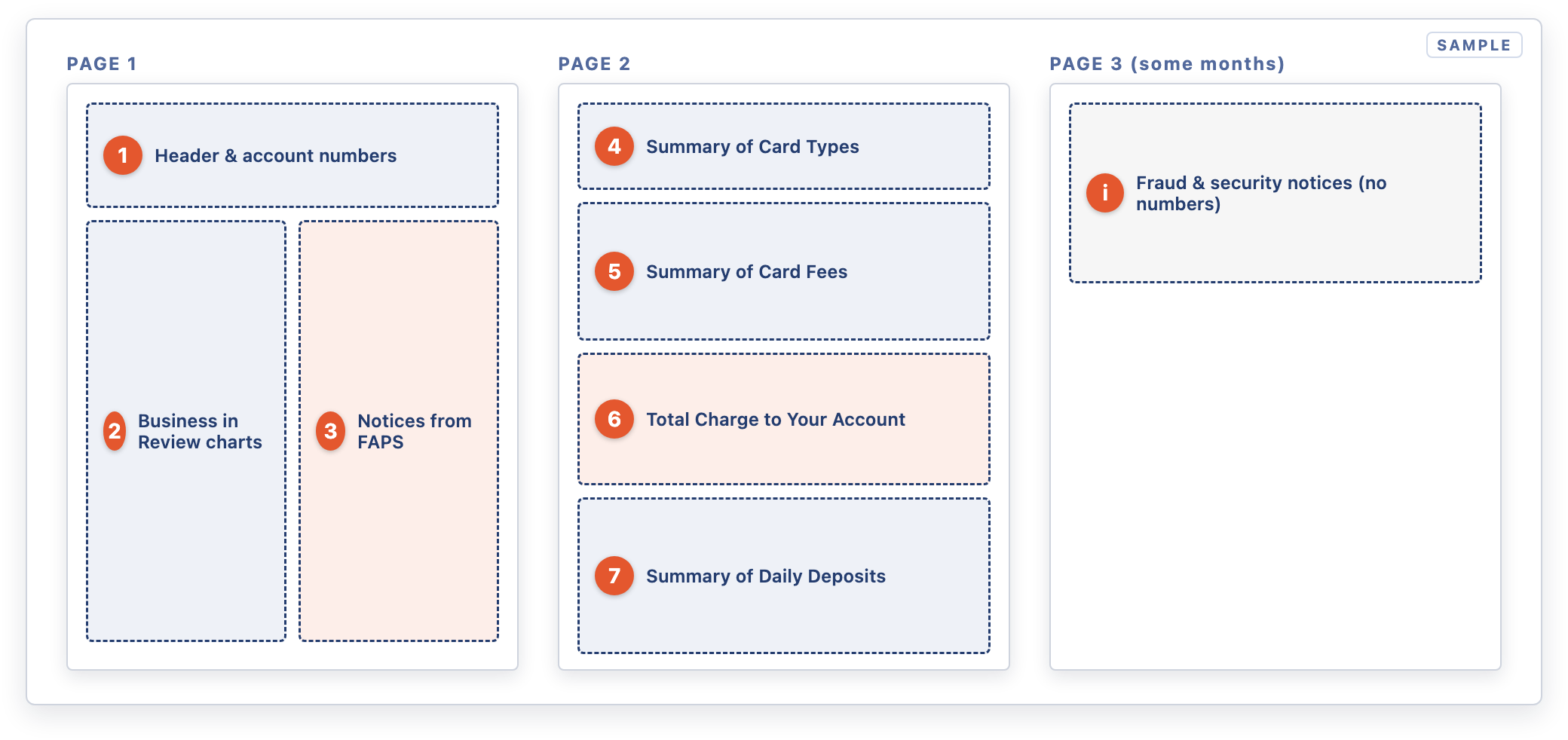
Where each section sits on the statement
1Header and Account Numbers
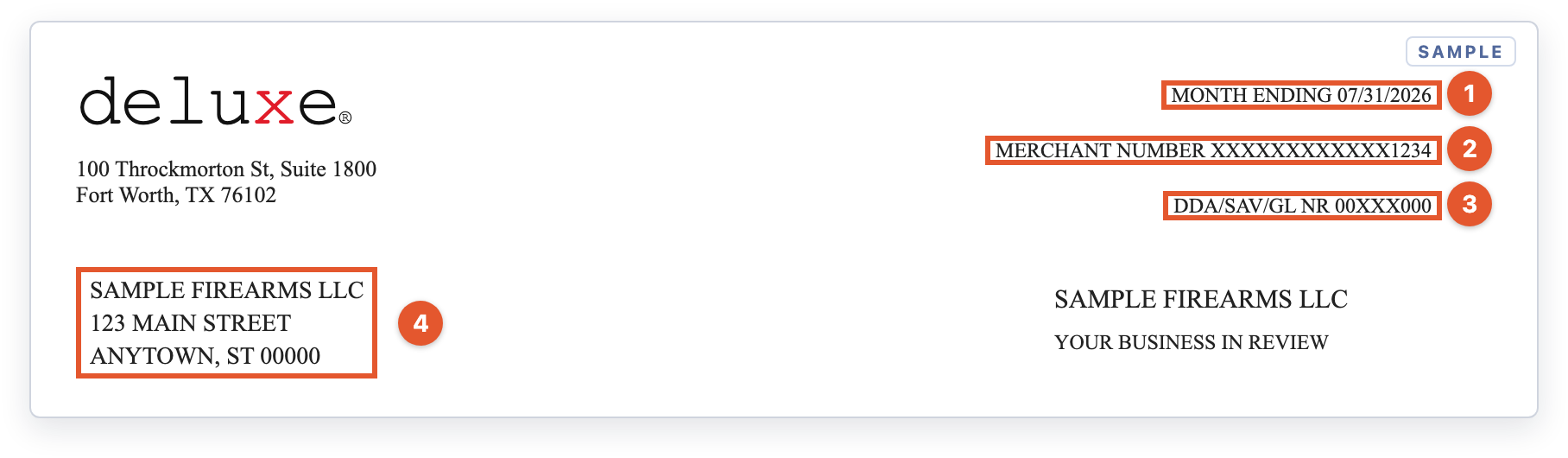
Top of page 1: the statement period and your account identifiers
- 1Month Ending. The statement covers the whole calendar month ending on this date.
- 2Merchant Number. Your FAPS merchant ID (MID). Have it ready whenever you call FAPS.
- 3DDA/SAV/GL NR. The masked bank account your deposits go into and your fees come out of.
- 4Business name and address. This should match your merchant account. If you've moved or renamed the business, tell FAPS.
2Your Business in Review
These charts on page 1 are a quick visual summary. They show sales, not fees. A month with no card sales shows No Data Available.
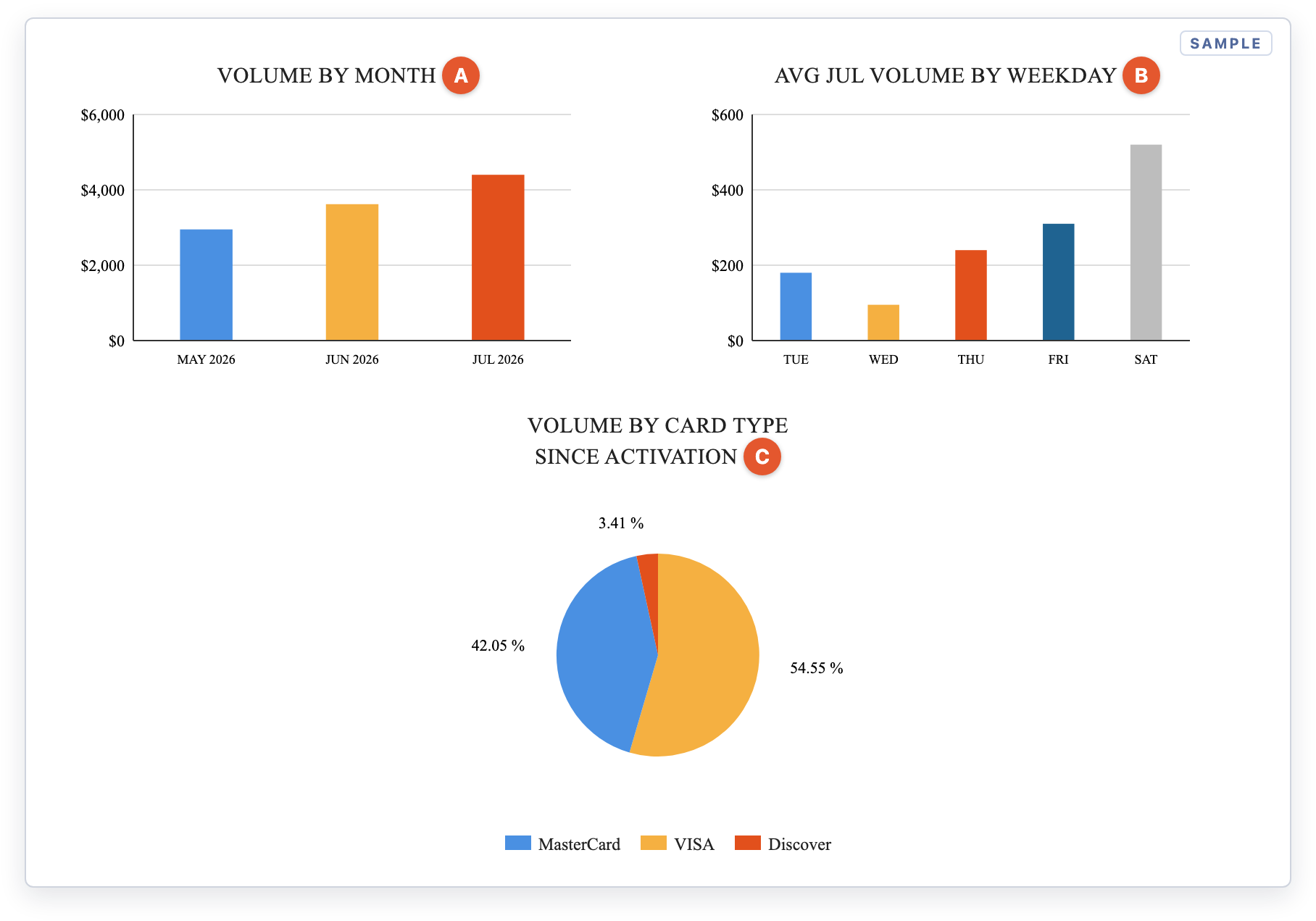
The three charts on page 1
- AVolume by Month. Total card sales for each month since the account was activated. You can spot seasonal trends here.
- BAverage Volume by Weekday. Your average daily card sales for each weekday this month. Only days with sales are shown.
- CVolume by Card Type. Each brand's share of all your card sales since activation, not just this month.
3Notices. The boxed text beside the charts is where FAPS announces fee changes, card-brand program updates and scam warnings. Skim it every month. New fees are usually announced here one or two months before they appear.
4Summary of Card Types: What You Sold
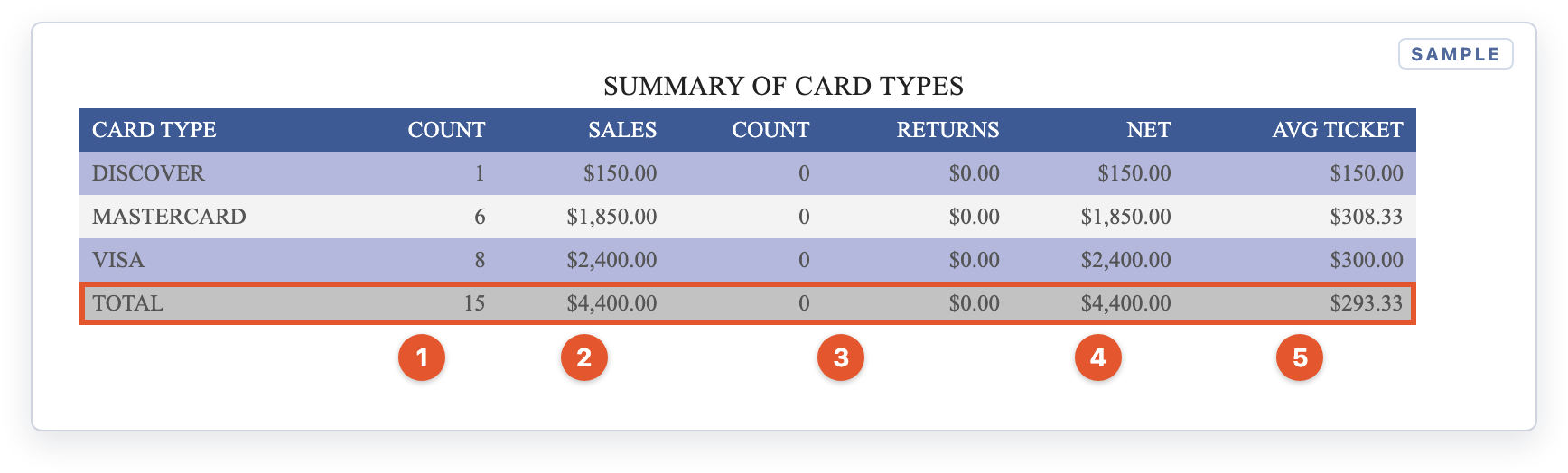
Page 2: sales totals by card brand
- 1Count. The number of sales transactions for each card brand.
- 2Sales. The dollar total of those sales.
- 3Returns. The number and dollar total of refunds back to customers' cards.
- 4Net. Sales minus returns. The highlighted TOTAL row is your net card volume for the month. You'll use it to work out your effective rate below.
- 5Avg Ticket. Net ÷ count, which is your average card sale.
5Summary of Card Fees: What Each Brand Cost
Fees are grouped under a navy heading for each card brand: Visa, Mastercard, Discover and, if you take it, American Express.
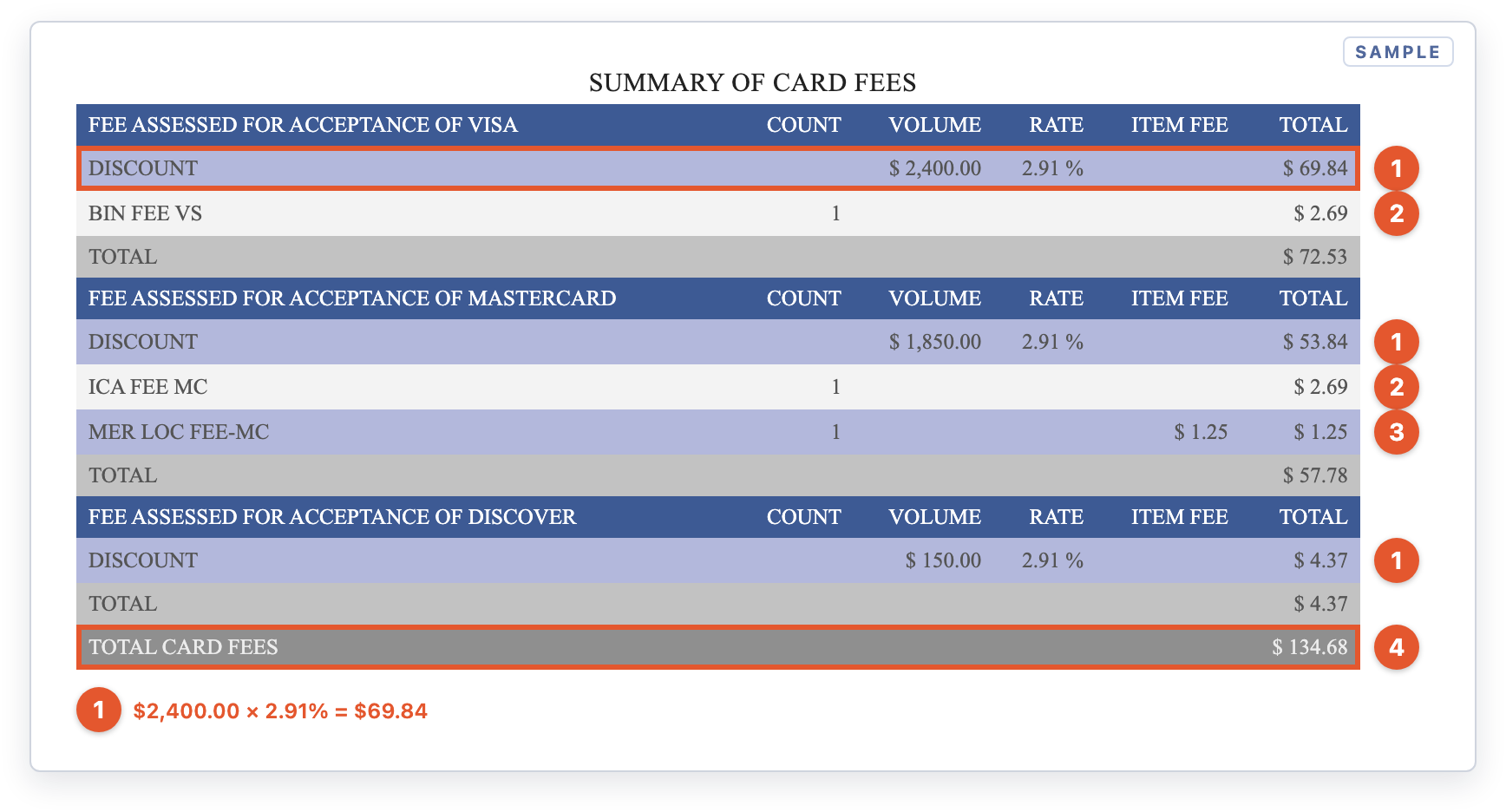
Page 2: card fees grouped by brand
- 1Discount. Your rate × that brand's volume. In the sample, $2,400.00 of Visa sales × 2.91% = $69.84. Check that the Volume matches the Sales figure for that brand in Summary of Card Types.
- 2BIN Fee (Visa) / ICA Fee (Mastercard). Flat monthly card-brand registration fees. You pay these even in a month with no sales.
- 3Mer Loc Fee (Mastercard). A flat Mastercard fee per business location. The Item Fee column shows the per-location price.
- 4Total Card Fees. The sum of every brand's total. This single number carries into the next section.
6Total Charge to Your Account: The Bottom Line
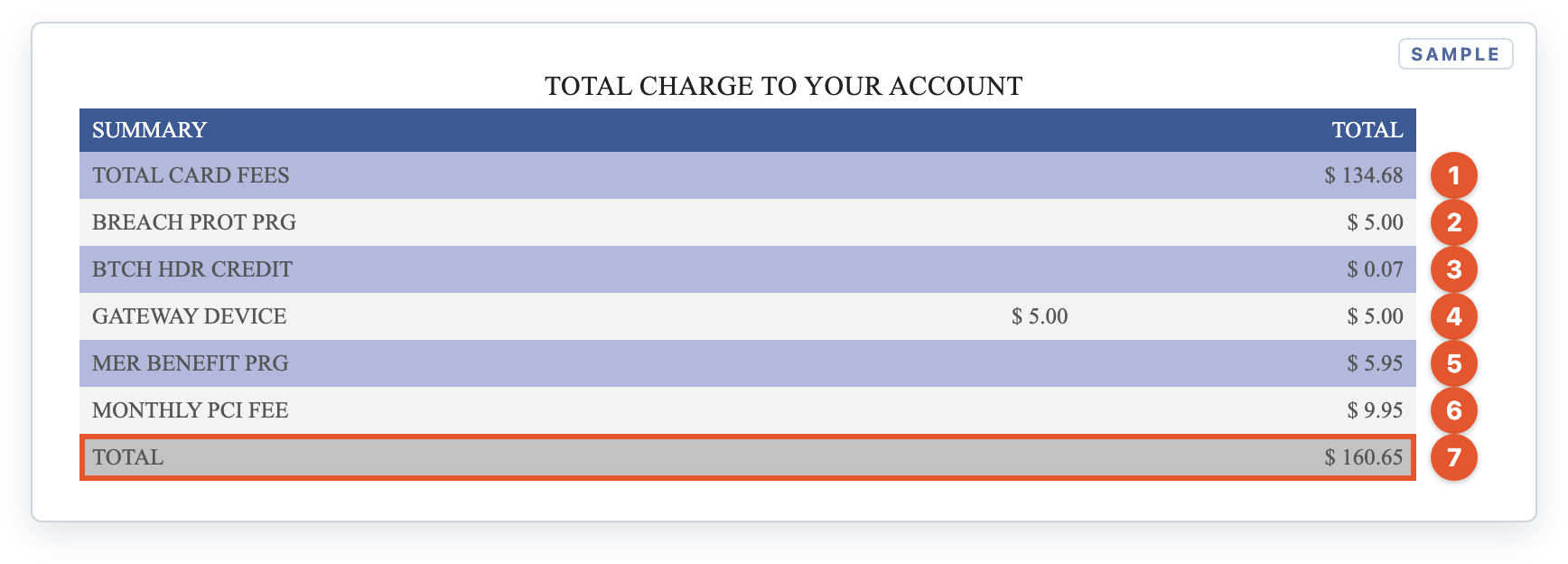
Page 2: every fee for the month, added up
- 1Total Card Fees. Carried over from the Summary of Card Fees.
- 2Breach Prot Prg. Breach Protection Program. A flat monthly fee.
- 3Btch Hdr Credit. A batch fee of a few cents that goes up by about $0.01 for each day you settle a batch.
- 4Gateway Device. A per-device fee. The middle column is the price per device, and the right column is the total.
- 5Mer Benefit Prg. Merchant Benefit Program. A flat monthly fee.
- 6Monthly PCI Fee. A monthly PCI compliance program fee.
- 7Total. Everything you paid FAPS for the month. This is the number to record as your card processing expense.
In months when you run no cards at all, you still pay the fixed fees. The charts say No Data Available and page 2 shows only these lines:
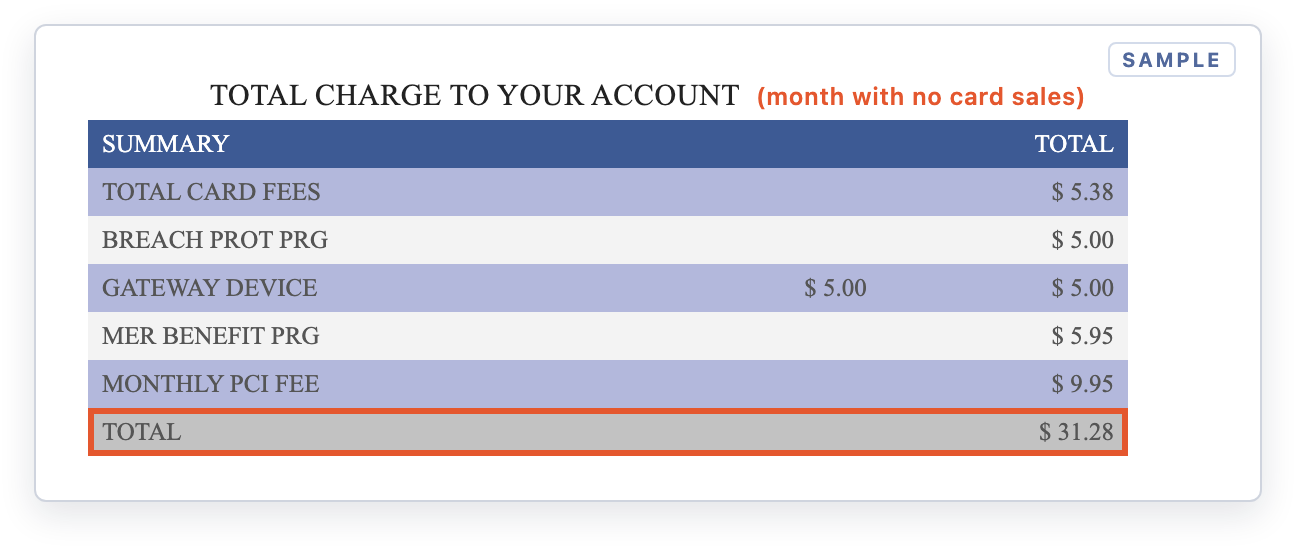
Example: a month with no card sales still carries fixed monthly fees
7Summary of Daily Deposits: What Reached Your Bank
Each row is one settlement day. This is the section you match against your bank statement.
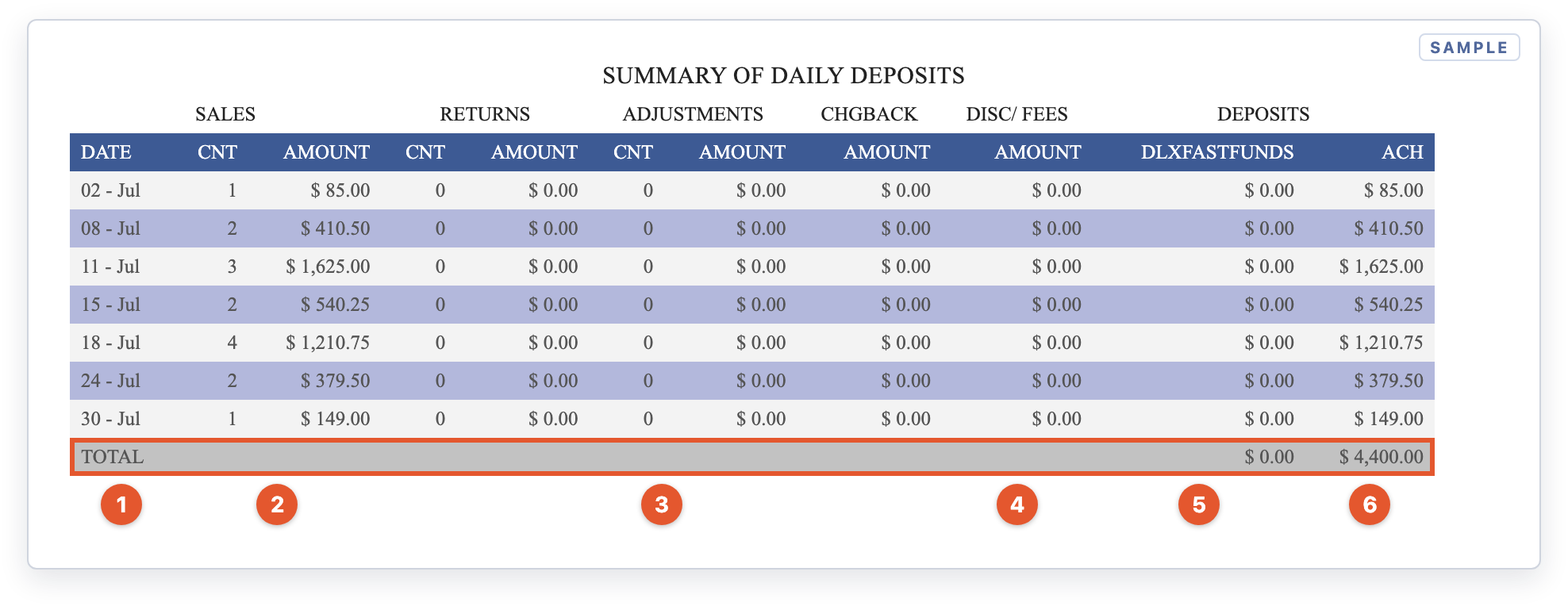
Page 2: one row per settlement day
- 1Date. The day the batch settled with FAPS. The bank deposit usually lands a business day or two later.
- 2Sales Cnt / Amount. The card sales in that day's batch.
- 3Returns, Adjustments, Chgback. Refunds, corrections and chargebacks subtracted that day. A chargeback here means a cardholder disputed a sale. Watch for the FAPS dispute notice.
- 4Disc/Fees. Fees taken out of that day's deposit. $0.00 means your fees are billed once a month as a single debit for the Total Charge.
- 5DLXFASTFUNDS. Money sent through Deluxe Fast Funds, if you're enrolled in faster funding.
- 6ACH. The amount deposited to your bank for that day. The highlighted TOTAL is everything deposited for the month.
If your fees are taken daily
Some accounts, or some months (for example, the month an account is set up), have the discount taken out of each day's deposit. The statement then looks slightly different:
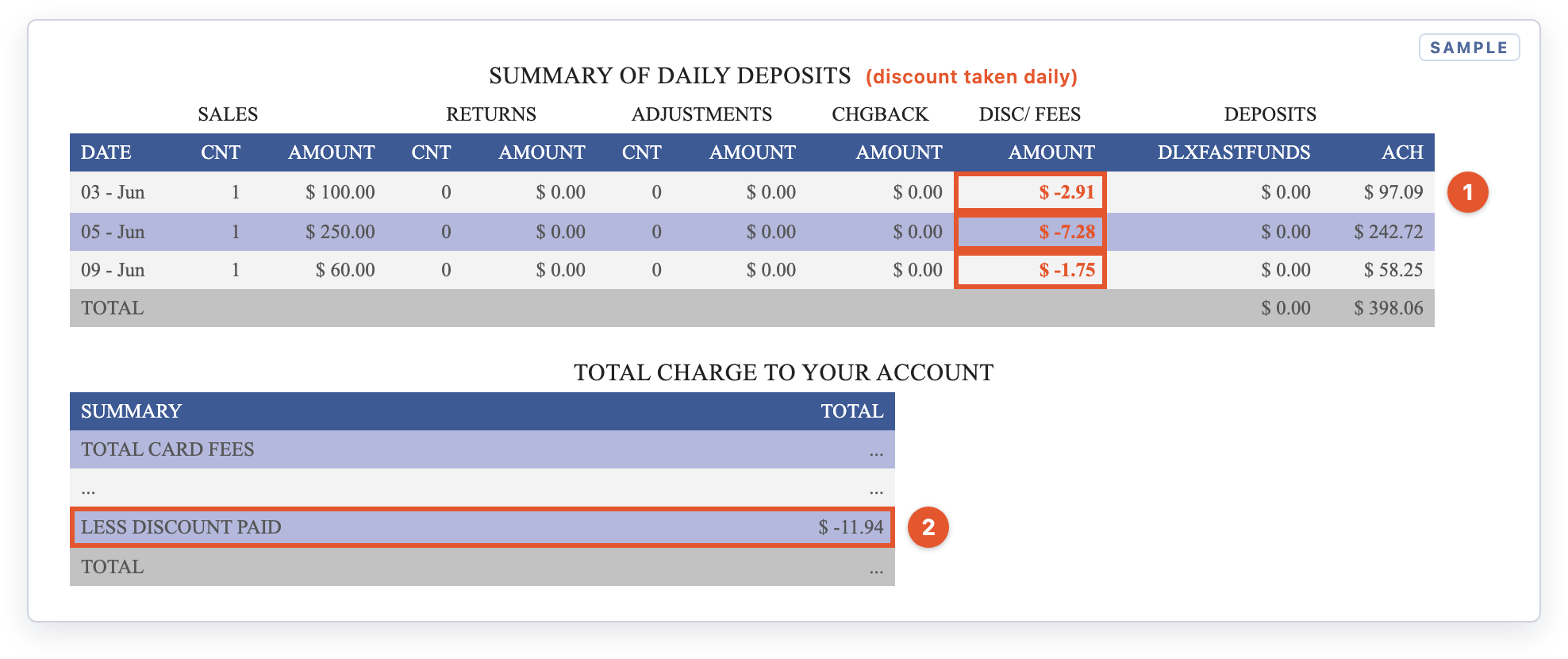
Daily discount: fees come out of each deposit, then are credited back in the summary
- 1Disc/Fees shows a negative amount each day. Here, $100.00 in sales × 2.91% = $2.91 is withheld, so $97.09 is deposited.
- 2Less Discount Paid. The summary subtracts what was already taken from your deposits, so you aren't charged twice. The Total here is only what's still owed, not the full cost of the month. To get your full processing cost, add Less Discount Paid back onto the Total.
Check Your Effective Rate
Your effective rate is the one number that tells you what card acceptance really cost you this month, including every fixed fee. Divide section 6's Total by section 4's net sales:
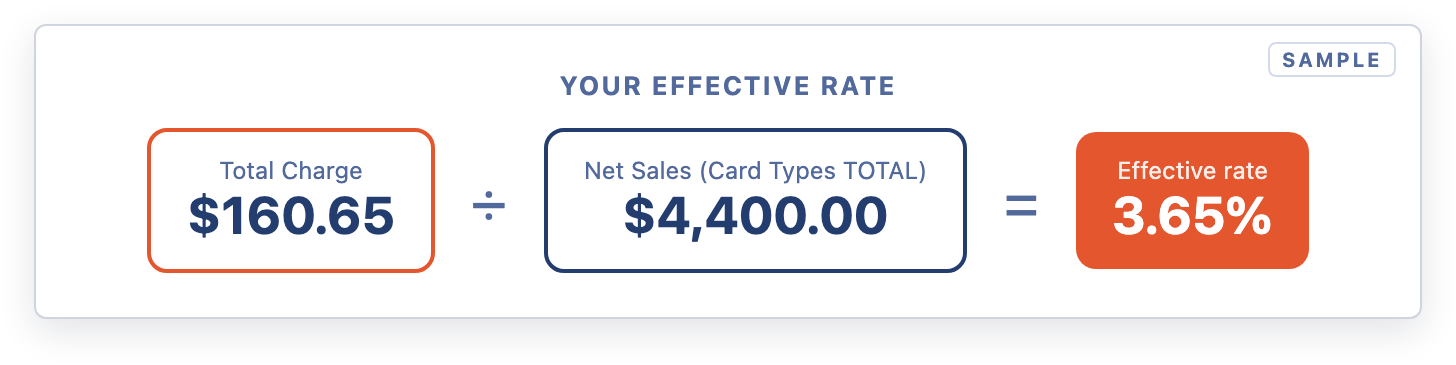
Effective rate = Total Charge ÷ Net Sales
Expect it to be a little higher than your Discount rate because of the flat monthly fees. In slow months it rises sharply: $31 of fixed fees on $1,000 of sales adds about 3 percentage points on its own.
Steps: Reconcile Your Statement Each Month
- Match sales. Compare the Summary of Card Types Net TOTAL to your Orchid POS or eCommerce card sales for the same month.
- Match deposits. Tick off each ACH amount in the Summary of Daily Deposits against a deposit on your bank statement.
- Match the fee debit. Find a single withdrawal for the Total Charge amount, usually early the following month.
- Look for new lines. Compare Total Charge to Your Account with last month. Any new line should match a notice from a previous statement.
- Work out your effective rate. Divide the Total Charge by net sales and track it month to month.
Expected Result
- Net card sales match your Orchid sales report.
- Every ACH line matches a bank deposit, and the monthly fee debit matches the Total Charge.
- You know your effective rate and can explain every fee line.
Fee Line Glossary
| Line on statement | What it means |
|---|---|
DISCOUNT | Your percentage rate × that card brand's sales volume. Usually the largest fee. |
BIN FEE VS | Visa's flat monthly registration fee. Charged even in months with no sales. |
ICA FEE MC | Mastercard's flat monthly registration fee. Charged even in months with no sales. |
MER LOC FEE-MC | Mastercard Merchant Location fee, charged per business location in months you take Mastercard. |
BREACH PROT PRG | Breach Protection Program. A monthly program fee tied to data-breach cost coverage. |
BTCH HDR CREDIT | Batch header fee for credit batches. It's a few cents a month and tracks the number of days you settled a batch. |
GATEWAY DEVICE | Per-device gateway fee. The middle column shows the price per device. |
MER BENEFIT PRG | Merchant Benefit Program. A flat monthly program fee. |
MONTHLY PCI FEE | Monthly PCI-DSS compliance program fee. |
LESS DISCOUNT PAID | A credit for discount fees already taken out of your daily deposits, so they aren't charged twice. |
DLXFASTFUNDS | Money funded through Deluxe Fast Funds (faster funding), if you're enrolled. $0.00 if not. |
ACH | The amount sent to your bank account for that day. |
MRP VOL-MC / MRP TRAN-MC | Mastercard Specialty Merchant Registration fees (0.10% of volume and $0.02 per transaction). They started July 2026 for merchants enrolled in that program. |
MCHIP DEPLOY PERF PRG-MC | Mastercard per-terminal fee, charged only when a chip reader is identified as causing chip failures (from August 2026). |
Fee names, amounts and programs are set by FAPS and the card brands and can change. Your statement and your FAPS merchant agreement are the final word on your pricing.
⚠️ 90-day window for disputes
💡 Who to contact
Orchid doesn't process card transactions or set processing fees. For questions about your rates, a fee line or a deposit, call FAPS Customer Service at 1-888-453-4538 and have your Merchant Number ready.
For help with card readers, Orchid POS or eCommerce payments, submit a support ticket.